A self-hosted document system for a small business. Paper from the scanner, attachments from email and files from the desk go into one searchable archive. AI reads the details off each document and files it.
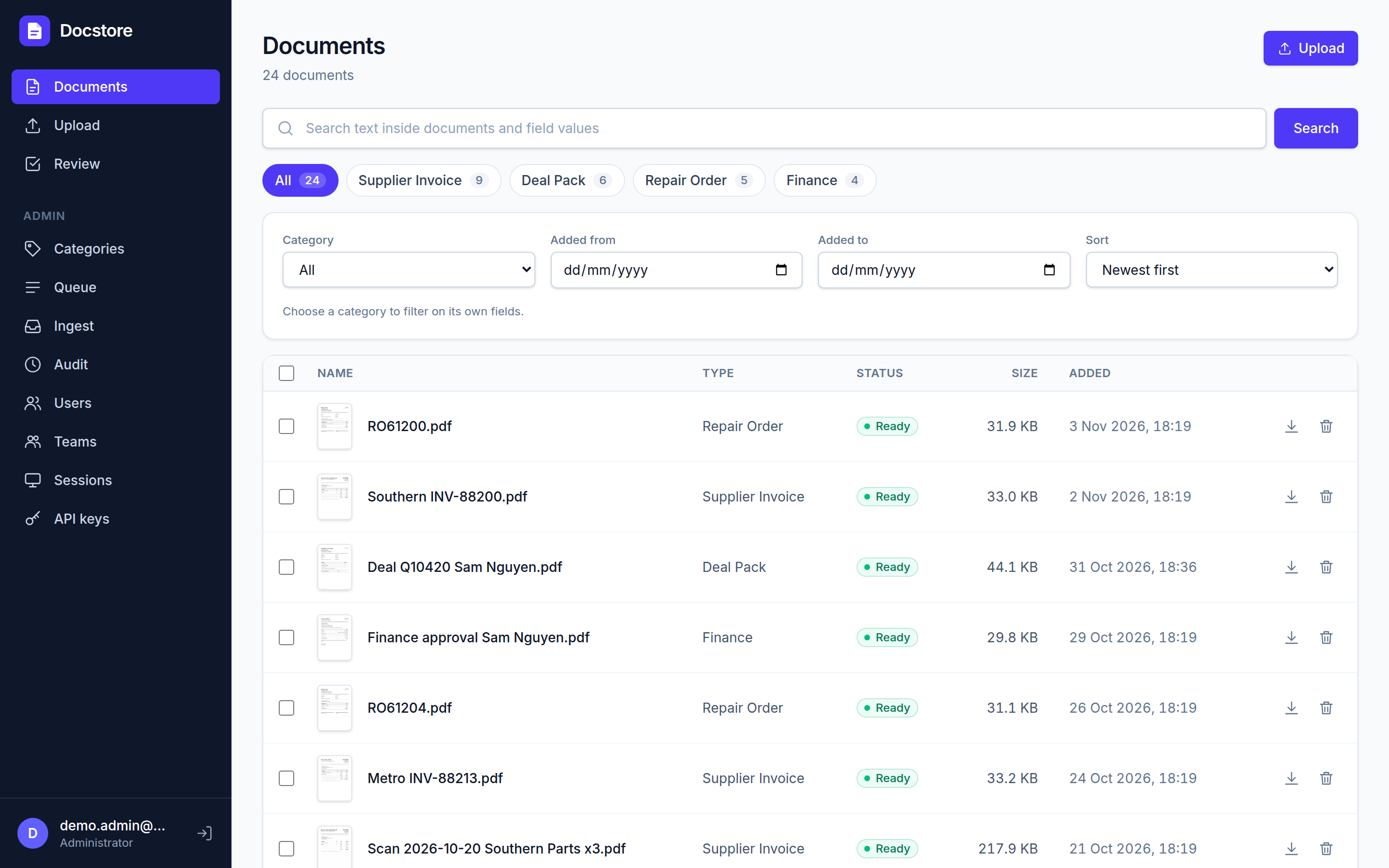
Every page searchableScans are run through OCR, so text inside a PDF can be searched like an email.
Fields read for youCustomer, invoice number, dates and totals are read off the page, with the doubtful ones flagged.
Runs on your serverDocker on a box in the office or a small cloud VM. The files stay on your disk, and only the pages you choose go to the AI.
What it does
From the scanner to the right folder, without anyone typing
Each document goes through the same steps whichever way it arrives. A person only steps in when the system is unsure.
1. ArrivesScanner folder, email inbox, drag and drop, or an import from the old system.
2. StoredKept exactly as received, fingerprinted, duplicates caught.
3. ReadOCR turns scans into searchable PDFs, straightened and rotated.
4. UnderstoodAI picks the category and fills its fields, with a confidence for each.
5. FoundSearch by any word on any page, by field, date or category.
Getting documents in
Scanner folder: scanners save to a Windows share as they do today. Each folder maps to a category, and files are moved aside once they are in.
Email: a Google Workspace mailbox is watched. Attachments are filed by sender, subject or label rules. The sender, subject and message text are kept with each one.
Upload: drag in many files at once, optionally straight into a category with some fields already filled.
Migration: bring an existing archive across, keeping its original dates and metadata (proven on 20,000 documents from M-Files).
PDFs and images (JPEG, PNG, TIFF) are read with OCR. Office files and emails are stored and downloadable.
Reading and filing
Categories such as Deal Pack, Supplier Invoice or Repair Order, each with its own fields: text, number, date or a pick list.
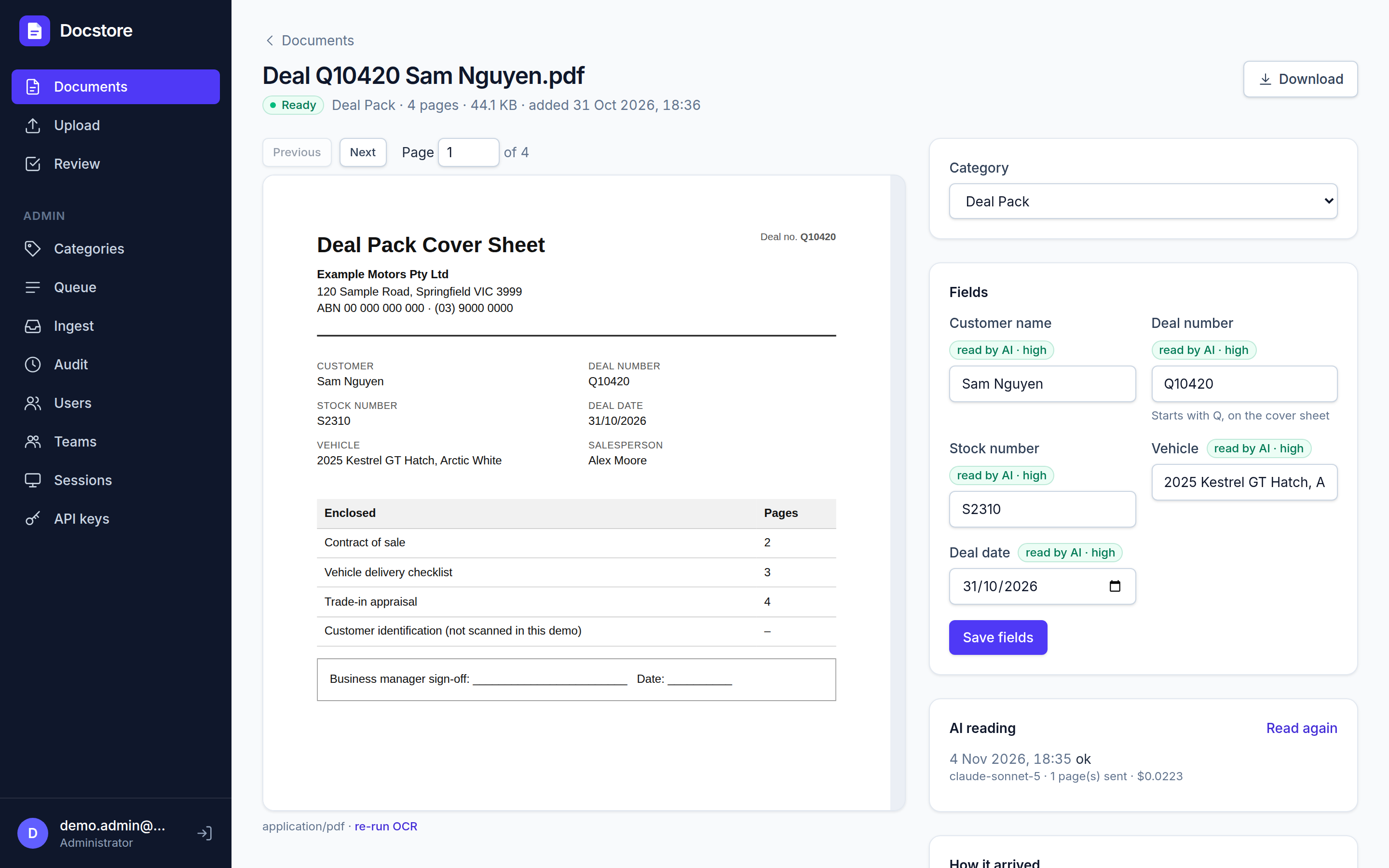
AI reads the fields and gives each a confidence. Low-confidence values are highlighted and the document is queued for review.
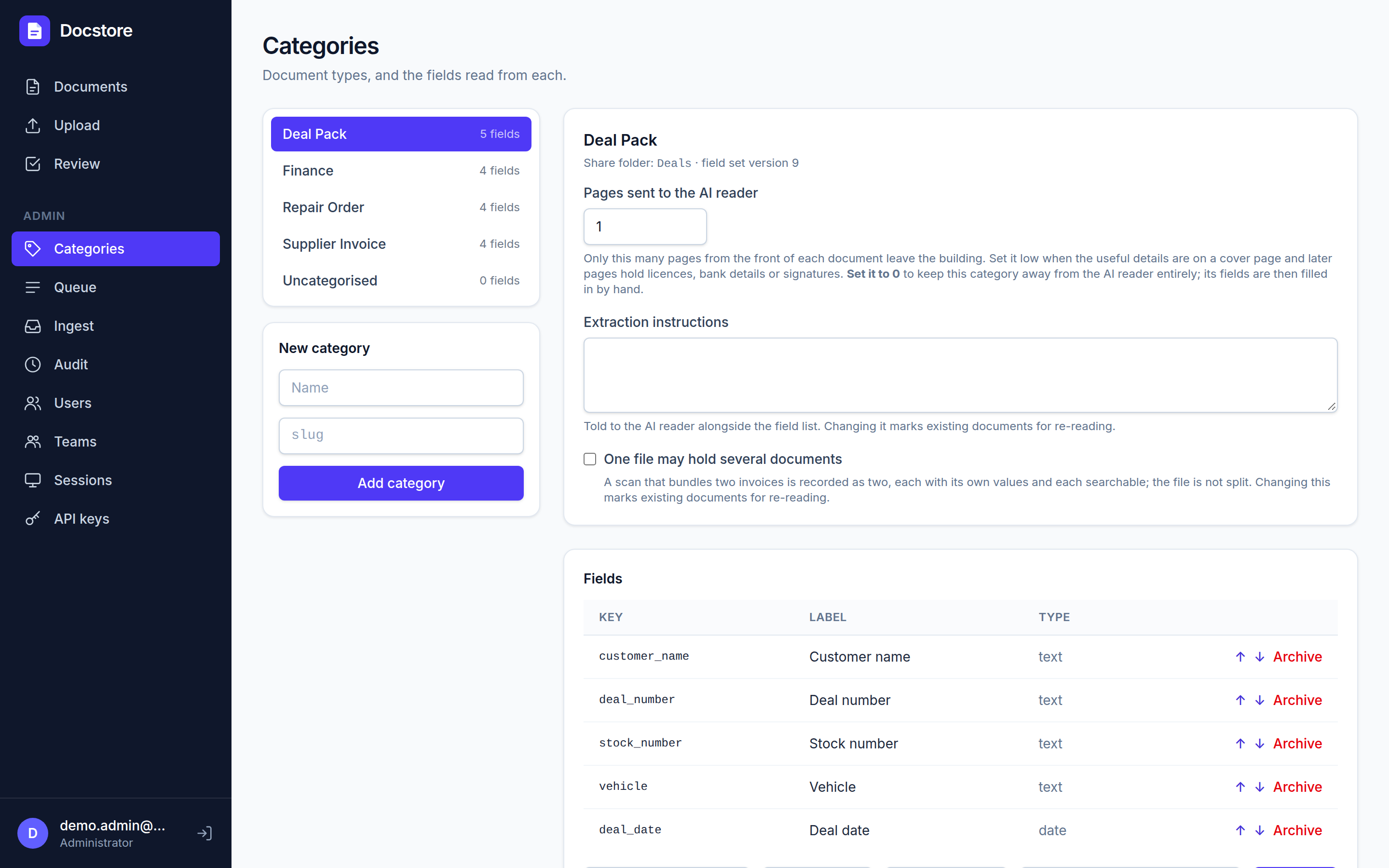
Privacy per category: an administrator sets how many pages of each kind of document the AI may see. A deal pack sends only its cover sheet, so the contract, licence and finance pages behind it never leave the building. 0 keeps a category away from the AI entirely.
Automatic filing: documents arriving without a category are sorted into the right one.
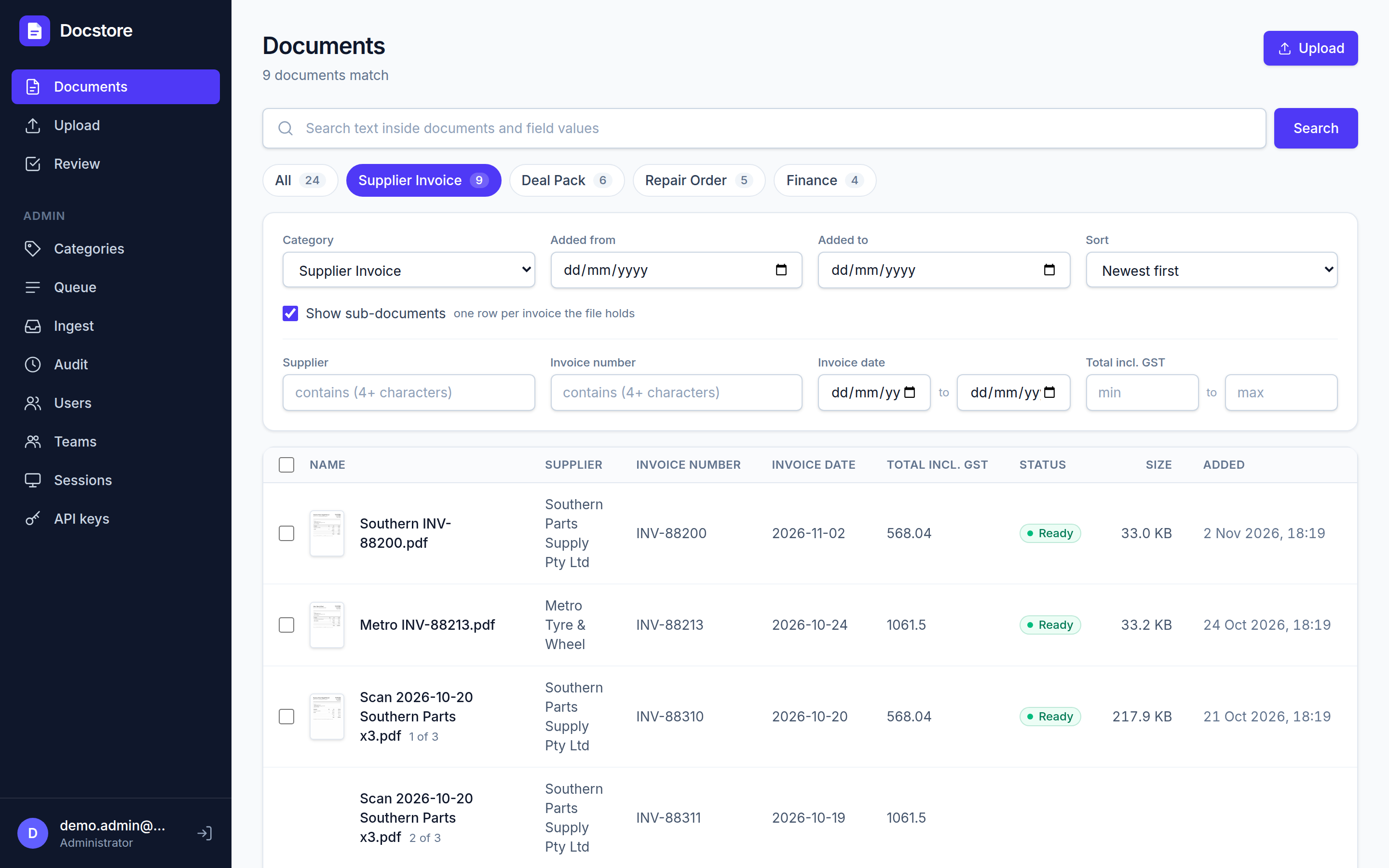
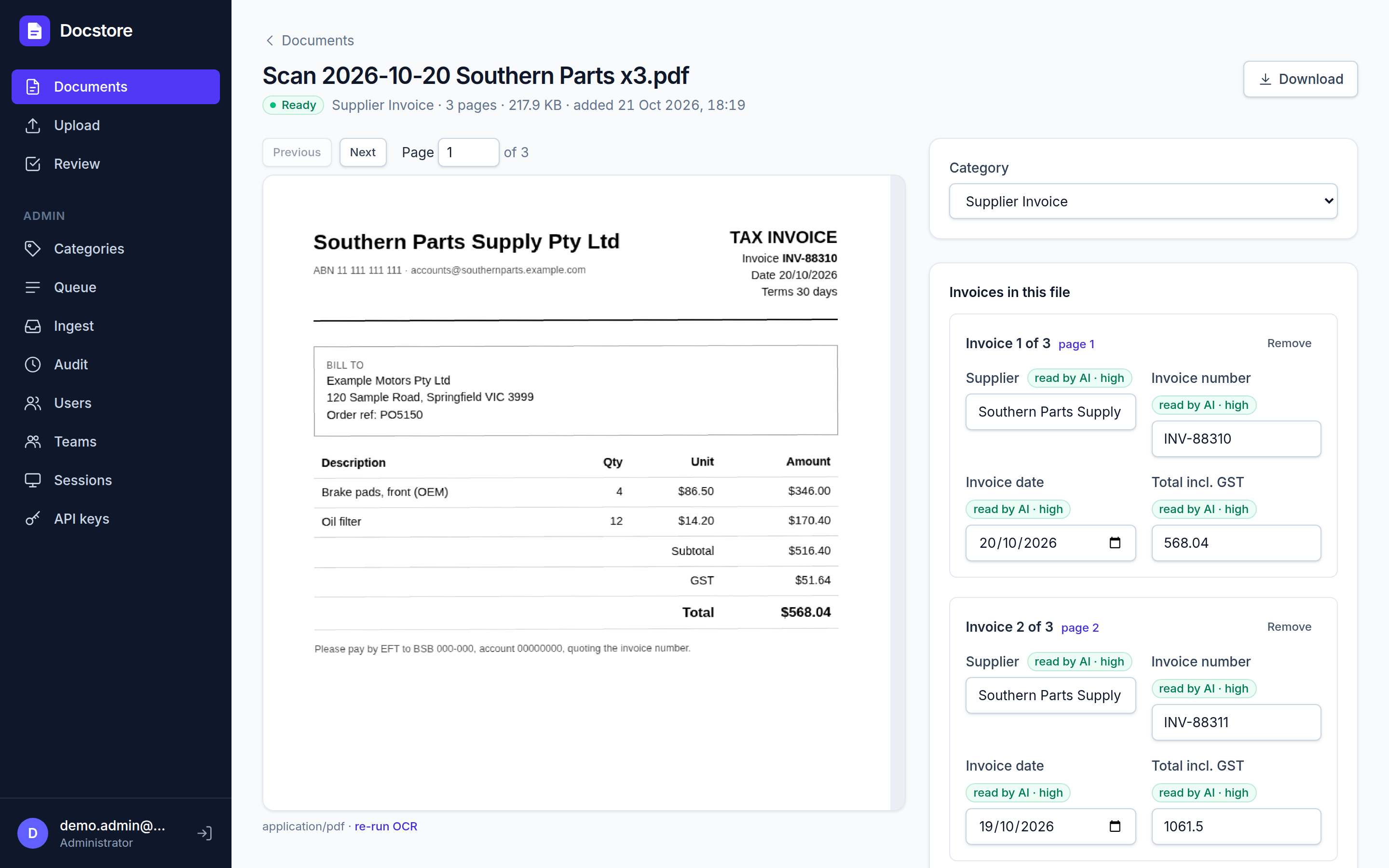
Several invoices in one scan are recognised and listed separately, each with its own number, date and total.
Every value shows whether a person or the AI set it. People's corrections are never overwritten.
Change a category's fields later and re-read old documents in one click.
Finding things
One search box across the text of every page, the field values, file names and email subjects.
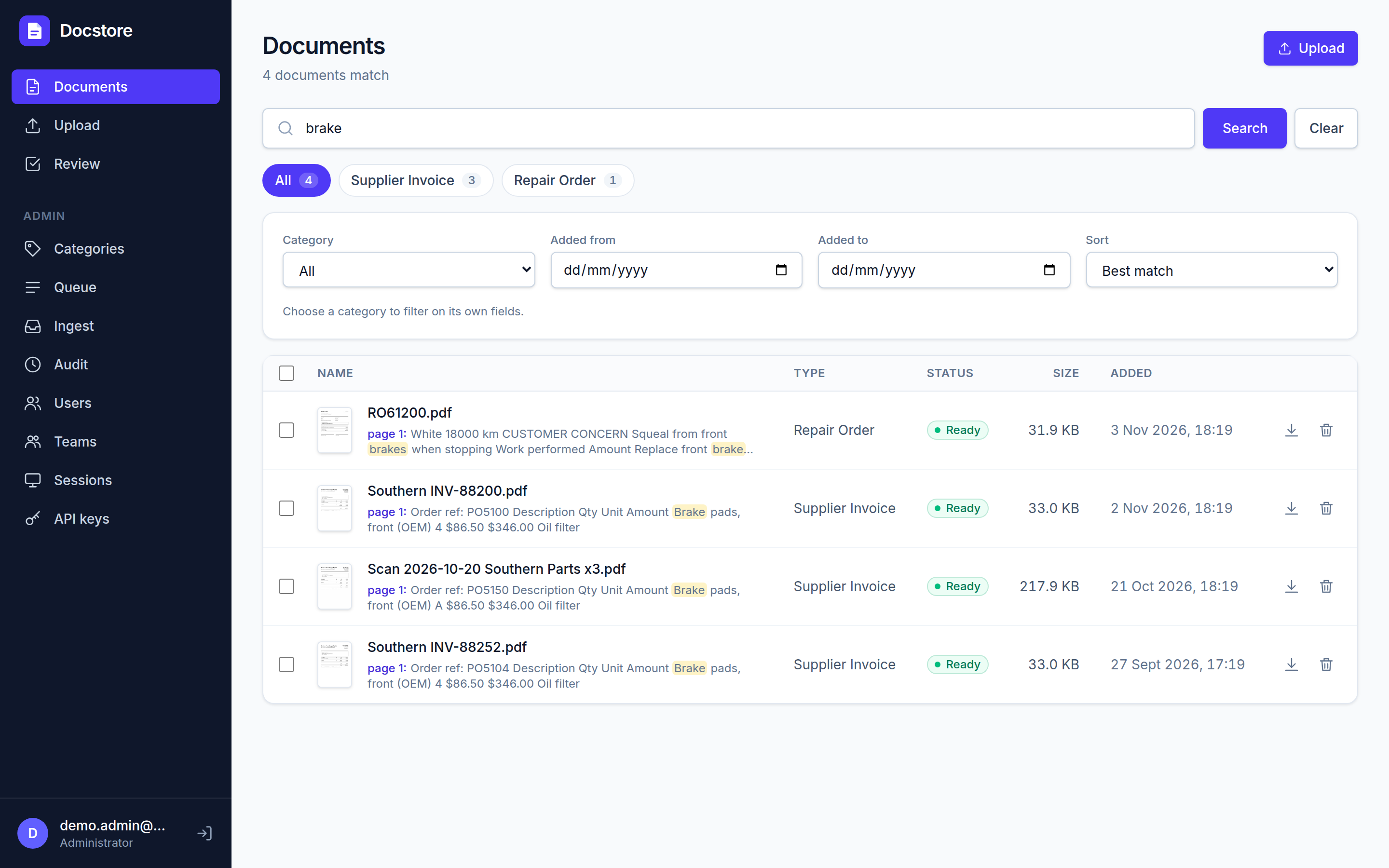
Results show the matching words in context and jump to the page they are on.
Filter by category, date range and field values, including ranges ("invoices over $5,000 in March").
Codes match with or without punctuation: ABC123 finds ABC-123.
Built-in PDF viewer with thumbnails. Download the searchable copy or the untouched original.
People, access and safety
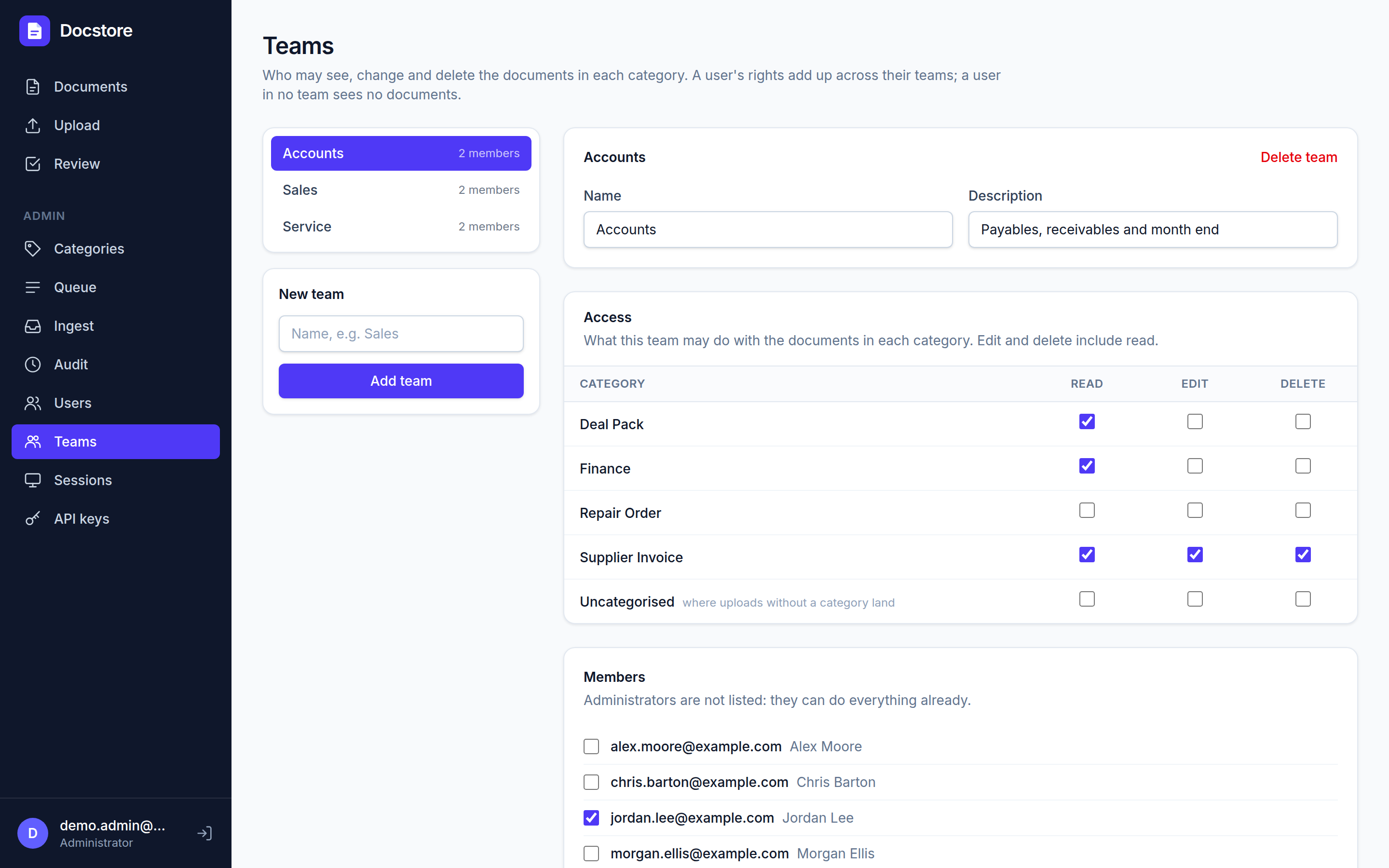
Teams are granted read, edit or delete per category. For example, Sales sees deal packs but not supplier invoices.
Administrators manage users, sessions, categories and intake rules from the browser.
Deleted documents go to a 30-day bin before their files are removed.
Audit log of every change: who, what, when, and the before and after values.
Nightly encrypted backups, local and offsite, with an automatic test restore of the database every night.
API for other systems: read-only keys let a dealer system or accounts package search and open documents, optionally limited to certain categories.
Under the hood
Built on
Web app
React with Tailwind, served by the API. Works in any modern browser and on a tablet.
API and worker
Node.js 22 and TypeScript (Hono). One worker process handles the queue, OCR and intake.
Database
PostgreSQL 17, with full-text search and the job queue in the same database. No Redis and no Elasticsearch.
OCR
OCRmyPDF with Tesseract, with automatic rotation, straightening and skipping of pages that already have text.
AI
Anthropic Claude (Sonnet) through the official API. The model is a setting.
Files
Stored once, named by their SHA-256 fingerprint and never modified, so a copy can always be checked against its name.
Backups
restic to any S3-compatible store, SFTP or a local disk.
Screenshots
Finding documents
Full-text search. "brake" finds the word in a repair order and in supplier invoices, including one that was only ever paper, and shows the page and the words around it. The chips above say how many of each category matched.One category, its own columns. Choosing Supplier Invoice adds its fields as columns and filters: supplier, invoice number, a date range and a total range. With "Show sub-documents" ticked, each invoice inside a multi-invoice scan gets its own row.
A document and the fields read from it
A deal pack. Four pages, but the AI was sent only the cover sheet: the AI reading panel says "1 page(s) sent", at about 2 US cents. The fields on the right (customer, deal number, stock number, vehicle and date) were read from that page, each marked as read by the AI and how confident it was.Three invoices, one scan. A batch fed through the scanner together is recognised as three invoices, each listed with its own number, date and total, and each searchable on its own.
Behind the scenes
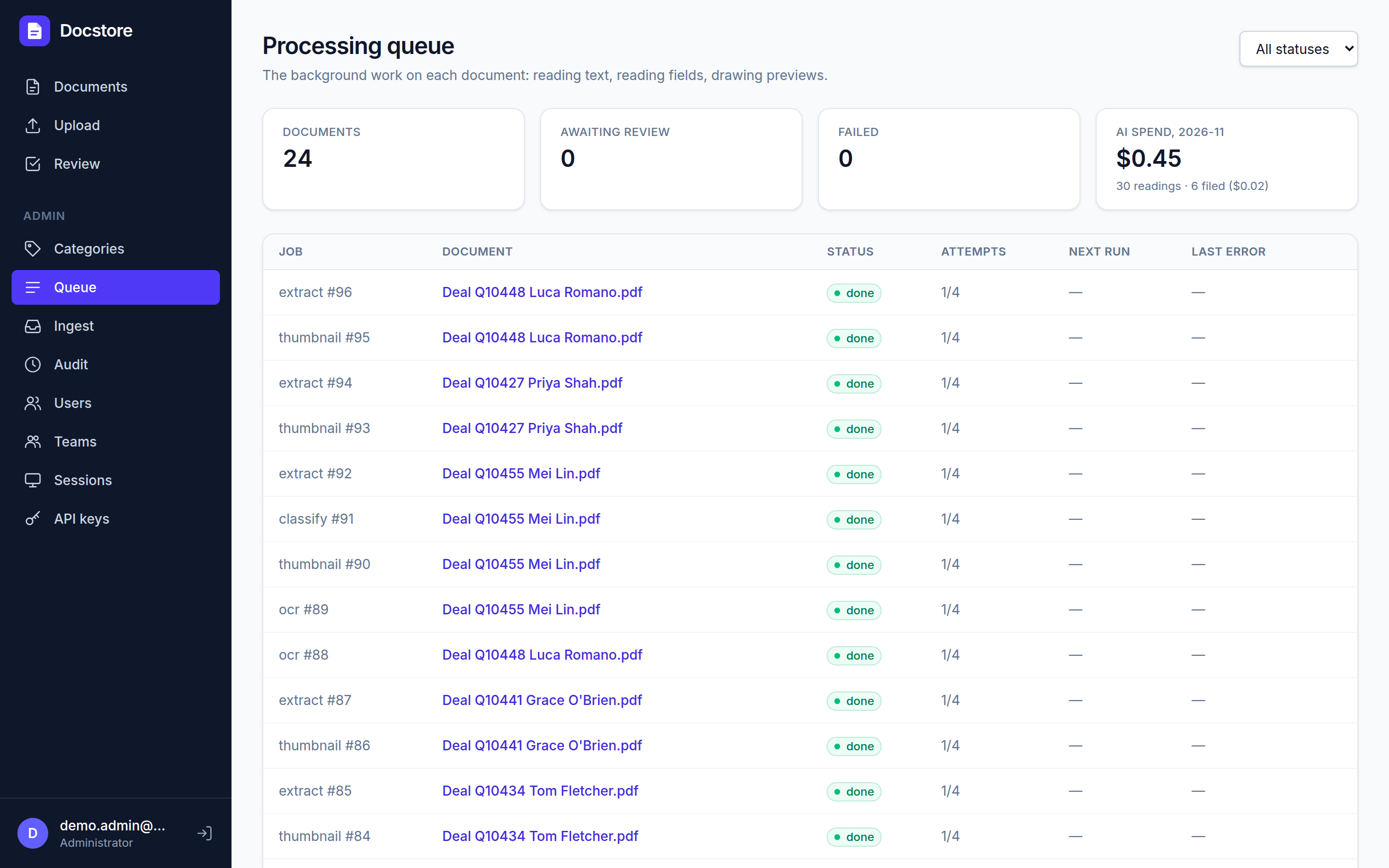
Processing queue. Every OCR, AI reading and preview job, with automatic retries and the reason for any failure. The AI spend tile shows what reading and filing has cost this month.Categories and fields. An administrator decides what each kind of document should record and how many pages of it the AI may see. Deal Pack is set to 1, the cover sheet; 0 keeps a category away from the AI entirely.
Access and intake
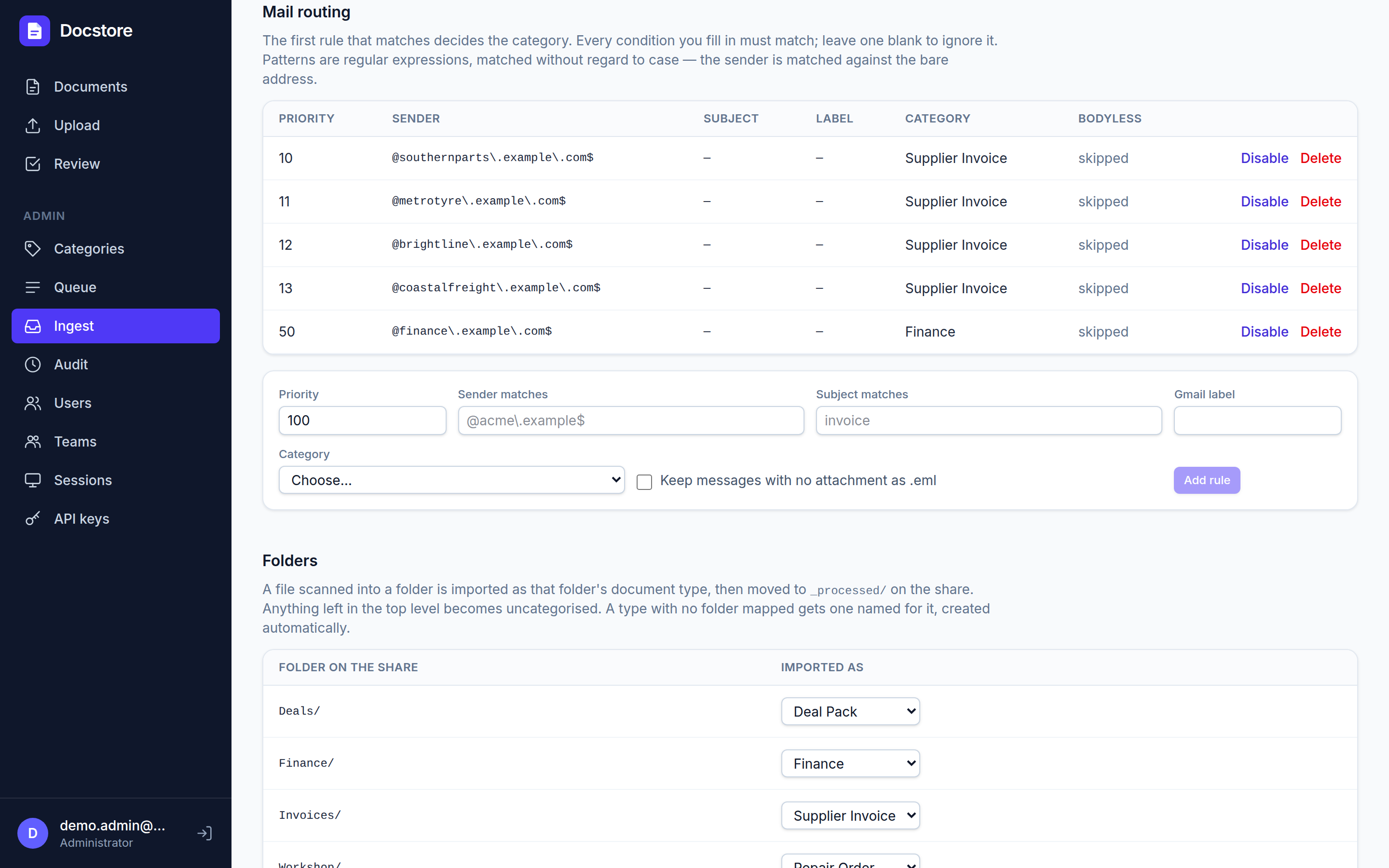
Teams. Accounts can read, change and delete supplier invoices, and only read deal packs and finance. A person in no team sees nothing.Intake. Email rules decide the category from the sender, subject or label. Each scanner folder feeds a category, and filed scans are moved aside on the share.
Hosting
What it needs to run
Four Docker containers on one Linux machine. It can share a server with other services; it needs no GPU and no special hardware.
Minimum
Recommended
Notes
CPU
4 cores (x86-64)
8 cores
OCR is the only heavy work, and it runs in bursts as scans arrive. More cores means a big batch is searchable sooner.
Memory
8 GB
16 GB
Uses about 1.2 GB when idle. Limits allow up to 12 GB during heavy OCR.
System disk
20 GB
40 GB
Docker images about 1.7 GB, plus logs and build space.
Data disk
See sizing below. SSD recommended for the database.
Files and database on one volume that can be grown later.
Operating system
Any current 64-bit Linux with Docker Engine and the Compose plugin
Runs on Debian, Ubuntu, Fedora, RHEL and similar, or a small cloud VM.
The containers
Container
Image
What it does
Memory limit
db
postgres:17-alpine
Documents, fields, users, search index and the job queue
4 GB
api
Node.js 22
The web app and API, logins, search, uploads
2 GB
worker
Node.js 22 + OCRmyPDF, Tesseract
OCR, AI reading, email and scanner-folder intake
6 GB
caddy
caddy:2-alpine
Web front door; HTTPS automatically when given a domain name
small
Disk sizing
Measured at a site holding 20,000 documents, mostly multi-page deal packs averaging about 30 pages: 38 GB of files and 1.7 GB of database. Single-page invoices are far smaller. Budget roughly:
Documents held
Files
Database
With searchable copies kept
10,000
20 GB
1 GB
about 40 GB
50,000
100 GB
5 GB
about 200 GB
100,000
200 GB
10 GB
about 400 GB
A separate searchable copy of each PDF is kept by default for faster viewing. It can be switched off to halve the file storage, and search works either way. At about 1,650 documents a month, a typical dealership adds 1 to 2 GB a month.
Network and accounts
Inbound
One web port on the office network (HTTP), or 443 with a domain for HTTPS. Users only need a browser.
Outbound
HTTPS to the AI provider (Anthropic) for reading fields. Optional: Google's Gmail API for email intake, and S3-compatible storage for offsite backup.
Scanner share
Optional. Read and write access to the Windows share the scanners save to, using an account that can move files.
Accounts
An Anthropic API key (pay as you go). For email intake, a Google Workspace service account. For offsite backup, an S3 or Backblaze B2 bucket.
Backups
A nightly job dumps the database, then backs up the dump, the files and the settings with restic (encrypted and deduplicated) to a local repository and an offsite copy in S3. It then restores the dump into a scratch database to prove it works before reporting success. The OCR'd copies are left out because they can be regenerated. Offsite storage for 100 GB costs about US$1.25 a month in S3 Infrequent Access.
Running costs
What it costs to run
Docstore is licensed once per site, with no per-user or monthly charge. Hosting is your own server. The running cost is the AI reading each document, paid to the AI provider per use.
Item
Cost
Basis
AI reading of fields and filing
US$0.01–0.05 per document
Claude Sonnet reads only the pages each category allows. Measured at one site: about 4.5 US cents for a supplier invoice batch read at 5 to 6 pages, and 1 to 2 cents for a deal pack read from its cover sheet alone.
OCR
nil
Runs locally on the server's CPU.
Hosting
nil extra
An existing server. A cloud VM with 4 cores, 8 GB and 250 GB is roughly US$25–45 a month.
Offsite backup
US$1–3 / month
S3 Infrequent Access or Backblaze B2, about 100 GB.
Example volume
Documents a month
AI cost a month
Small office
300
US$8–12
Dealership (150 deals, 500 invoices, 1,000 other)
1,650
US$40–60
Busy multi-site business
5,000
US$150–200
Importing an old archive is the one cost to plan for. Documents brought in from an old system can skip AI reading entirely and still be fully searchable by their text, at no cost. Reading their fields as well costs the same few cents each, and can be done later, a category at a time.
AI pricing is the provider's list price at the time of writing (November 2026) and is billed in US dollars. Categories with no fields, such as a general "Correspondence" category, are never sent to the AI.
Option
Running the AI on your own hardware
The per-category page limits already keep most of each document on site. Some clients will want no page to leave the building at all. The AI step can be pointed at a model running on a local GPU server instead of the cloud API. That removes the per-document cost and keeps everything on site. In exchange it needs a GPU machine, and field accuracy is usually lower, so more documents land in the review queue.
Not built yet. Docstore talks to the Claude API today. The AI step sits behind a single interface, so adding a local model means writing an adapter for an OpenAI-compatible server such as Ollama or vLLM. That adapter is a contained piece of development, not a setting. OCR, search and everything else already run fully locally.
Local model contenders
Open-weight models that can read a page image or OCR text and return the fields. They are listed as of November 2026; this field moves monthly, so test on the client's own documents before choosing.
Model
Licence
Role
GPU memory (4-bit, approx.)
Qwen3-VL 8B
Apache 2.0
Reads page images and text. Widely regarded as the best all-round open model that runs on a single consumer GPU.
12–16 GB
Qwen3-VL 32B
Apache 2.0
The same family, noticeably better on dense or messy pages.
24–32 GB
Gemma 4 12B / 26B MoE / 31B
Apache 2.0
Google's open family (April and June 2026), with image input across all sizes and strong multilingual text.
12–16 GB / 24 GB / 24–32 GB
PaddleOCR-VL 1.6, GLM-OCR
Apache 2.0, MIT
Small (about 1B) document readers that top current OCR benchmarks. They would replace Tesseract for hard scans; they do not fill fields themselves.
4–8 GB
olmOCR 2 (7B)
Apache 2.0 with responsible-use terms
PDF-to-text specialist built for very large batches.
at least 12 GB
Hardware tiers
Setup
Suits
Expect
CPU only (the Docstore server itself)
Trying it out
Minutes per document even with a small model. Not practical for daily intake.
One 16 GB GPU (for example an RTX 4060 Ti 16 GB or 5070 Ti)
7–12B models
Workable for a small office's volume. The weakest accuracy of these options.
One 24–32 GB GPU (for example an RTX 4090 or 5090)
Up to about 32B models
The sensible tier for a dealership: the stronger models, with room for several pages at once.
Apple Mac Studio, 64 GB or more
Up to about 32B models
Quiet and simple to run. Slower than a comparable NVIDIA card, but fine for overnight batches.
When it pays
At a dealership's volume the cloud API costs about US$40–60 a month, so a GPU workstation would take several years to pay for itself on cost alone. Choose local for privacy, regulation or very high volume, not to save money. The two can also be mixed: OCR stays local in both cases, and only the field reading needs a choice.
Sources
docsumo.com/blog/best-ocr-models (OmniDocBench v1.6 and olmOCR-Bench results, checked 29 Sep 2026)
roboflow.com/blog/best-open-source-ocr-models
mixpeek.com/curated-lists/best-vision-language-models; dev.to, "Open-Source Vision Language Models 2026: Which to Self-Host"
en.wikipedia.org/wiki/Gemma_(language_model) (Gemma 4 sizes, licence and release dates)
spheron.network/blog/run-qwen3-locally-gpu-requirements-2026; hostinger.com, "Ollama GPU requirements" (memory for 8B and 32B models)
GPU memory figures are for 4-bit quantised weights plus room for a few page images, rounded up to common card sizes. They are estimates, not measurements on this system.